 Book an appointment
Project Overview
Sphinx Solutions partnered with Locks4Phone, a digital wellbeing app developed for
Android users that helps manage and control phone usage through a scheduled lockout. The
app allows users to set lock durations, reset passwords, and prevent system tampering
for uninterrupted focus.
With features like ad management, premium and free subscription choices, and a secure
admin panel for managing users, subscriptions, and reports, our team made this idea a
reality with Locks4Phone.
The aim was to create a straightforward, dependable, and easy-to-use experience for
administrators and users. The result is user-friendly, effective, and lightweight
software available on the Google Play Store. It gives consumers the tools to focus,
reduce screen time, and develop better digital habits.
Client Requirement
Problem Statement
The smartphone has made us hyperconnected, so the problem of
overreliance on these devices is now surfacing as low
productivity, high distractions, and many mental health
ailments. Although there are many digital well-being tools, none
provide a simple, effective, and safe way for users to
voluntarily lock their phones for time constraints without the
risk of system exploitation or easy hacking.
The client identified a need for a dedicated Android application
that helps users manage their screen time and provides reliable
security controls, flexible lock schedules, and an intuitive
user experience. They also needed an all-inclusive admin panel
to manage subscriptions, monitor user behaviour and ad layouts,
and control the platform as an admin.
This leads straight to a positive feedback loop. Locks4Phone was
created to fill this gap with a beautiful digital wellbeing app
that empowers users to stay concentrated, reduce distractions,
and develop better phone usage habits on any Android device.
Solutions Implemented
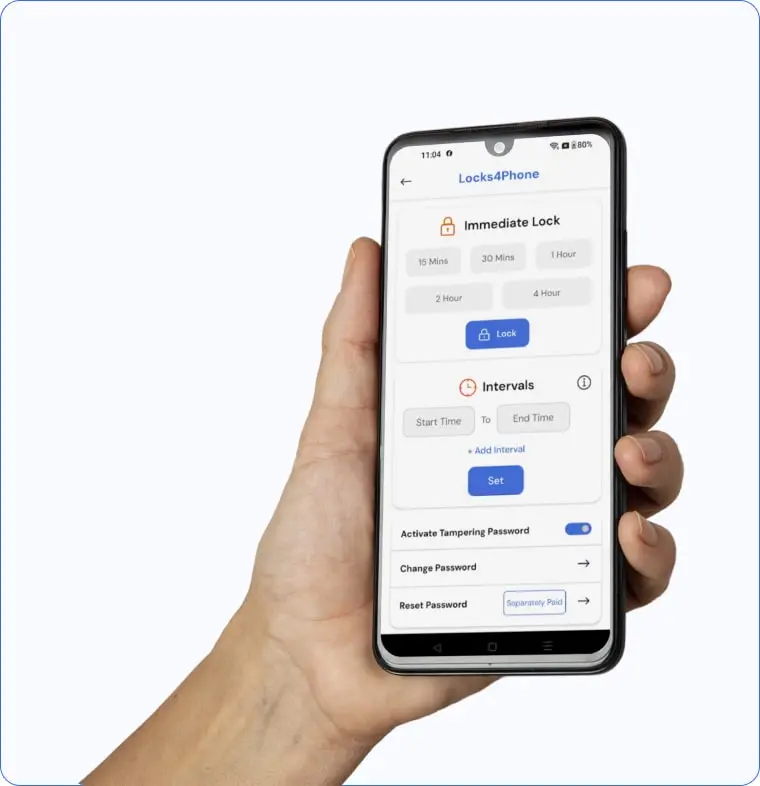
At Sphinx Solutions, our goal for the Locks4Phone project was to develop a lightweight, secure, and easy-to-use Android app that helps users manage their screen time effectively. We built a performance-optimised application that runs smoothly in the background with minimal battery and memory usage.
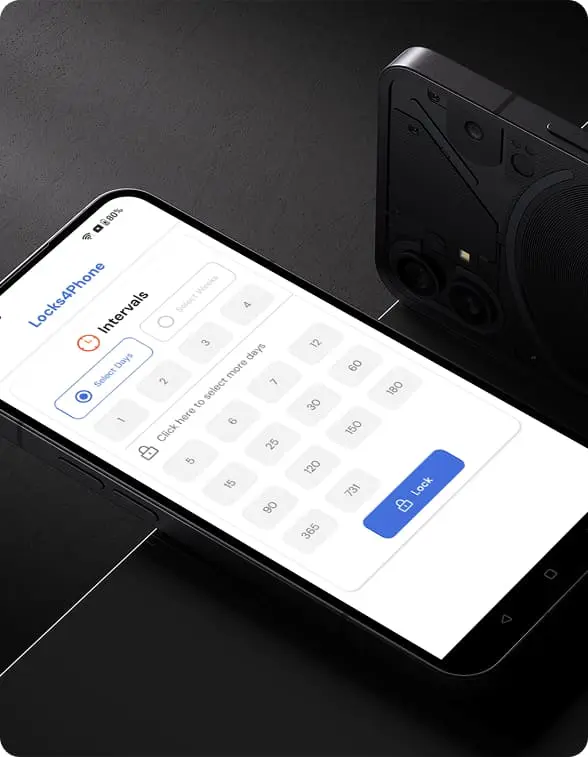
We integrated essential features like scheduled lockouts, password protection, and tampering prevention for uninterrupted phone locks to address the client's requirements. Flexible subscription options were implemented, offering free and paid versions with additional benefits such as ad-free access, multiple lock durations, and usage tracking.
We also designed a clean, modern, user-friendly interface to ensure simple navigation and quick setup for all age groups. Alongside the app, a secure web-based admin panel was created to manage users, subscriptions, password reset requests, advertisements, and reports. Extensive testing across various Android devices ensured reliable and consistent performance for every user.
Development Process
Requirement Gathering & Analysis
We began by understanding the client’s vision, target audience, and core requirements for a digital well-being app. Detailed discussions helped us outline the key features, security needs, and backend functionalities for the mobile app and the admin panel.
UI/UX Design
Our design team crafted clean, intuitive, and user-friendly interface layouts, focusing on smooth navigation and quick access to essential features. The goal was to simplify the app for all age groups while maintaining a modern, visually appealing look.
Backend Architecture & Admin Panel Setup
We structured a secure backend system to handle user data, subscriptions, password reset requests, ad management, and usage reports. A web-based admin panel was developed for easy operational control, offering real-time management of users and app content.
Android App Development
Our developers built a native Android application integrating core features like scheduled lockouts, password protection, tampering prevention, and subscription management. Performance optimisation was prioritised to ensure minimal battery and memory usage.
Testing & Quality Assurance
The app underwent rigorous testing on multiple Android devices and OS versions to ensure stability, compatibility, and error-free performance. Special attention was given to security functions and the app’s ability to prevent bypass attempts during lock sessions.
Deployment & Post-Launch Support
After successful testing and client approvals, Locks4Phone was deployed on the Google Play Store. We provided post-launch technical support and updates to maintain smooth functionality, address user feedback, and enhance features as needed.
A Sphinx Solution Perspective
“We saw Locks4Phone as more than just a screen-locking app; it was an opportunity to help people build healthier phone habits and reclaim their focus in a world of constant digital distractions. Our team concentrated on developing a straightforward, safe, and reliable tool that helps users manage their screen usage. We wanted to provide regular smartphone users with more than a tool, a solution to encourage good habits by fusing simple design, clever security features, and a considerate user experience.”
Shubham Mahajan
Implementation Step
Challenges
Solutions Delivered
Impact it Created
Simplified Screen Time Management
Locks4Phone made it easier for users to manage their phone usage habits by offering scheduled lockouts and screen restrictions in just a few taps. It reduced distractions and helped users stay focused during work, study, or family time.
Enhanced App Security & Tamper Prevention
The app’s secure lock features and tamper-prevention controls provided users reliable protection against unauthorised access. It gave them confidence that their lock sessions couldn’t be bypassed, ensuring a safe and uninterrupted phone-free experience.
Flexible Subscription Experience
Locks4Phone accommodated various customer requirements by providing several subscription levels and a clear, ad-free paid edition, all while ensuring a seamless, lightweight experience for both free and premium users.
User-Friendly Design for All Ages
Thanks to the user-friendly interface, anyone, regardless of age, could easily set up lock periods, manage subscriptions, and request password resets.
Customer Testimonial
“The Locks4Phone app has been a game-changer for our digital wellbeing initiative. Its simple setup, secure locking features, and reliable performance made it easy for users to manage screen time and focus better. The clean design and thoughtful features like tamper prevention and scheduled lockouts set it apart. Thanks to the Sphinx Solutions team for understanding our vision and delivering an app that met every expectation. Their professionalism, technical expertise, and commitment made this project a smooth and successful experience for us.”
Summing Up
Locks4Phone partnered with Sphinx Solutions to create a secure, lightweight, and easy-to-use Android app for digital wellbeing and phone usage management. We developed a performance-optimised mobile app with advanced lock features, flexible subscriptions, and a user-friendly admin panel.
The project successfully enhanced user focus, reduced digital distractions, and provided reliable phone locking solutions for all age groups. With its clean interface, tamper-proof controls, and seamless performance, Locks4Phone now offers a trusted, hassle-free way for users to control their screen time.
Take Control of Your Screen Time!
Lock your phone, cut distractions, and stay focused when it matters most.
FAQ
Questions & Answers
web and mobile solutions
Our work speaks for itself


Agro Trading
Read the entire case study on how we developed the first B2B Trading platform in India. We built a highly efficient web and mobile applications.
Read More


yarn bazaar
The Yarn Bazaar is a holistic B2B yarn trending platform. It received huge huge funding in the popular tv show Shark Tank India.
Read More


house bytes
HouseBytes is a school management software that helps educational institutes effectively manage their student's activities.
Read More
TURN YOUR IDEAS INTO REALITY.
LET’S CONNECT TO CREATE SOMETHING GROUNDBREAKING!
